25 May 2026
I am a decent user of the terminal, but I am not strong at remembering find flags - or rsync, or grep for that matter.
I read Rémi Louf’s post about wiring a comma and a question mark into his shell and immediately wanted the same thing. The idea is simple: type , <description> and get a shell command that does what you described. Type ? <question> and get an AI answer right in your terminal.
Rémi runs a local Qwen model through llama.cpp. I don’t have a local model, but I do have pi, a CLI chat agent, and I have my routing set through OpenRouter. Pi was already configured and working on my machine. So I took the idea and adapted it.
The comma
When I want nice shell commands, now all I have to do is type a comma followed by a plain English description of what I want to do. A few seconds later I get a suggested command copied to my clipboard. For example:
, find the 5 largest files in the current directory
A second later:
is copied to my clipboard. I press Cmd+V, the command lands on my prompt line. I read it, maybe edit it, then press Enter myself.
The comma is slightly safe because it won’t automatically execute. It copies to my clipboard and prints the command - so that I can judge and apply the keystroke between “here’s a suggestion” and “yes, do that”.
Under the hood it’s a thin shell script in ~/.dotfiles/bin/, on my PATH:
#!/usr/bin/env zsh
local command
command=$(pi --print -p --no-tools --thinking off \
  --system-prompt "output exactly one shell command —
  the best one — with no numbering, no explanation,
  no markdown, no backticks. Just the raw command
  on a single line." "$desc" 2>/dev/null)

echo -n "$command" | pbcopy
echo "$command"
Pi uses whichever model is currently selected. Typically for me this is on OpenRouterusing DeepSeek v4 Flash or Gemini 3.5 Flash. These have low or free API cost.
I skipped the JSON Schema trick from the original. I don’t think pi exposes a structured output mode, so I just made the prompt tight and stripped backticks in post.
The question mark
Likewise, when I just have a short question, I now have the q script. Instead of launching a whole pi session, I can get a quick answer with minimal fuss:
q what's the weather like today in Brutus, MI?
The q command also invokes Pi, but now Pi can use a narrow toolset including from some extensions:
pi --print -p \
  --system-prompt "You are a helpful, concise assistant
  running in a macOS terminal. Answer clearly and accurately.
  You can read files from disk and search the web — use those
  when you need current or file-specific information." \
  --tools "read,web_search,url_extract,web_fetch,batch_web_fetch" \
  "$question"
You can find the script files in my dotfiles repo on GitHub.
18 Nov 2019
You’ve been there - after putting your backpack in a frigid car, walking against the Wisconsin wind, or biking across the frozen lake, you arrive at work. You rest your palms on the keyboard to begin typing your password, and recoil in pain from the sudden cold of the metal sucking the heat from your skin.
How do you quickly warm up a laptop? Make it do a lot of work.
Here’s a one-line, built-in command that will peg your CPU to 100%:
Run that from a Terminal, and don’t forget about it heh. What the command does is repeatedly send the word yes over and over to the null device, using 100% CPU.
If you want to stress your Mac more quickly and get your CPU hotter, try the stress utility:
brew install stress
stress -c 6 -m 2 -t 300
This will start 6 threads that each peg your CPU to 100% and 2 thread that do memory malloc/free. It has a 300-second timeout (5 mins) in case you walk away from your computer so it doesn’t overheat.
Bonus points, you can add an alias to your ~/.bash-profile to automate these options:
alias warm='stress -c 6 -m 2 -t 300'
fred: bash$ warm
stress: info: [65121] dispatching hogs: 6 cpu, 0 io, 2 vm, 0 hdd
Happy winter!
25 Oct 2019
These are the slides from a talk I’m giving at Chippewa Valley Code Conference this weekend.
Here’s the talk abstract:
Brilliant developers, project managers, and IT professionals build tools perfectly suited to their users. So why don’t those users use them? In this talk, you’ll learn new ways to frame your discussion of your technology to make your users excited about the tool you’ve built to help them.
It’s frustrating when you’ve poured your creative energy into a tool that solves a problem for your users, but they don’t buy in . You know your users - they turn to you for help with their information problems, and you have the analytical skill to find solutions for them. So why is it so hard to get them on board with a new piece of software or hardware? As a developer, I found that subtly changing the way I talked about the exact same software led to way more progress with my users. Learn ways to get stakeholder buy-in using lessons in persuasion from entrepreneurship.
22 Mar 2019
When I started my new job, I was provided a new MacBook Pro to use as my work computer. I wanted to fit my new MacBook into my existing 27” Apple Cinema Display from 2010, which I’ve been using with my personal 2013 MacBook Air for 5 years. Should be easy, right? They’re both Apple products?
Wrong.
It turns out that Apple doesn’t even offer a first-party solution to connect the new Thunderbolt 3 (USB-C shaped port) MacBook Pro to the Cinema Display.
I went through 4 different orders on Amazon before I found a third-party combination that works, but now it’s working great.

The requirements
The Apple Cinema Display provides 3 ports in its cable - MagSafe power delivery; USB-A for the included USB hub, webcam, and speakers; and Mini DisplayPort for video.
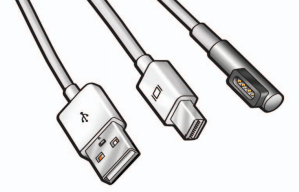
To get all three functions on my MacBook Pro, I needed:
- A MagSafe to USB-C adapter for power delivery
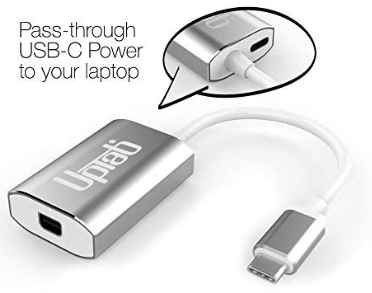
- A Thunderbolt 3 to Mini DisplayPort for video
- A USB-C to USB-A adapter for everything else.
Unfortunately the 13” MacBook Pro only has 2 Thunderbolt 3 ports, so I also needed some way to daisy chain or collapse two of these functions into one port.
The solution
I eventually found the right combination of adapters:
This has the important feature of the extra pass-through power port.
A slim profile to adapt USB-C to USB-A.
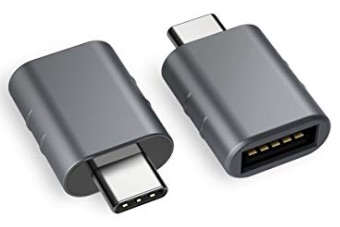
My only complaint about this adapter is that it gets very hot.

In the process I learned a lot about the difference between Thunderbolt 3 & USB-C, which use the same connector but don’t provide the same functionality.
In the end, I figured it out - hopefully this will help you. A not-terribly-messy-looking, serviceable way to connect at 2010 27” Apple Cinema Display to a modern MacBook Pro with Thunderbolt 3.
09 Mar 2019
We are in the middle of a “stuff” revolution.
The success of Mario Kondo’s book The Life-Changing Magic of Tidying Up and its Netflix successor Tidying Up speaks to what earlier books like Stuffocation have realized about our era: most of us have too much crap.
I fit neatly into the generational shift towards preferring experiences over things, but I’m also a hobbyist with a short attention span. Any time I take on a new hobby, I accumulate the associated stuff. And very occasionally, that stuff doesn’t make me feel “stuffocated” - it sparks joy, if you will.
These are a few of the things that “spark joy” for me. Hopefully they’ll bring you joy too.
Flex-Core Stainless Steel Removable Head, Dishwasher Safe
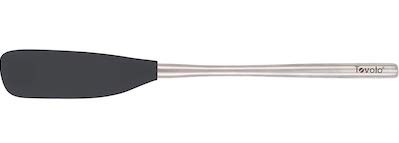
I find it easiest to explain why I love this spatula so much by considering the variety of tasks that we put a spatula through: it’s a tool that needs to be flexible enough to conform to the edges of a container, but sturdy enough to scrape away stuck-on bits. It needs to be wide enough to flip an omelet but narrow enough to fit into a jam jar. It should never scratch the coating of a pan, but never get melted from the heat. It should be able to get tossed in the dishwasher but not leave food residue trapped inside it.
This spatula nails all of these, which alone make it the best spatula I’ve ever owned, but that’s not what sparks joy about it.
It’s the heavy stainless-steel handle.
Like a good knife that is balanced to require only the tiniest effort from a cook, this spatula considers the ergonomic of its use. The heft of the handle helps press the spatula into the bowl so you don’t have to use a ton of force to scrape the sides. It can rest on the edge of a cutting board without tipping over the edge of the counter. And it’s removable, so you can thoroughly wash the joint between the head and the handle.
You can get one here, and help a charity through Amazon Smile:
https://smile.amazon.com/gp/product/B01EBZ0IFQ
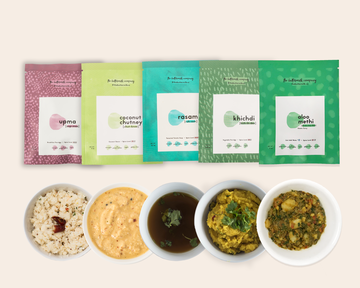
I never had Indian food until I was in college. I loved the richness and flavor-forwardness of the food in Indian restaurants in the U.S., and as I sought out more I learned there’s a whole world beyond what you get in those restaurants. Indian food has featured heavily in my Vegan January cooking explorations, and is an extremely versatile cuisine for the Instant Pot that I was recently gifted (for excellent Instant Pot Indian recipes, check out My Heart Beets). Buttermilk brings those real flavors of Indian kitchens, not just what’s found in restaurants, right to your freezer. The food is packaged fresh but freezes well, is all vegan, and takes around 5 minutes to heat up in a microwave. Their upma has become my weekday breakfast staple.
Get some Buttermilk and help me get some more too at http://buttermilk.refr.cc/frederict
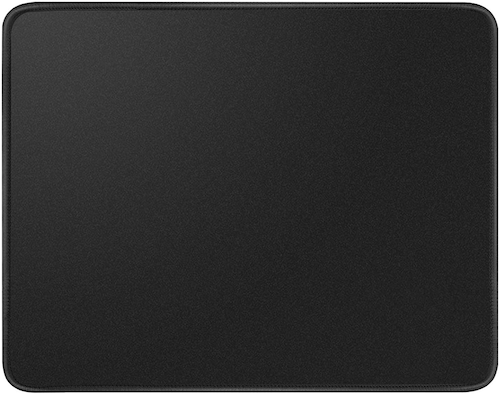
For years, I have used the surface of a desk or the bottom-tier mousepads freely distributed at my office. Spending $7 on a large mouse pat with a proper grip has improved my computer experience more than I ever expected. My mouse glides over the surface, it feels like an air-hockey table. This keeps up with the spatula’s theme of a tool helping me expend as little effort as necessary to use it well. It’s pretty new to me, so we’ll see how well it holds up, but I expect the stitched edges to go a very long way in preventing fraying. Get one at https://smile.amazon.com/gp/product/B07D99QJRS.
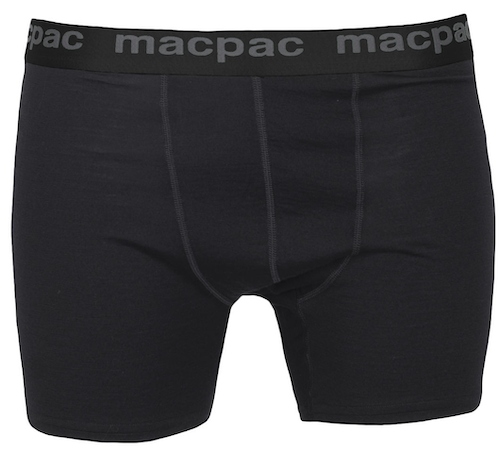
I bought these Merino wool boxer briefs while traveling in New Zealand, and they’re still my favorite pair after a year of wear. Merino is naturally anti-odor and moisture-wicking. These don’t ride up, the elastic in the waist hasn’t stretched out, and I can wear them for multiple days of a backpacking trip (ew) and they’re still comfortable and far less ripe than a dri-fit T-shirt worn at the same time (I know from experience). You can’t get them shipped to the U.S., but maybe ask a friend down under to mule them home for you? (Looking at you, Zac).

These towels are outrageously expensive but totally worth it. They are woven with these little waffle pockets that soak up water but are very breathable, so the towel always feels cool and light and always has capacity to dry more. https://onsentowel.com/products/the-onsen-bath-sheet?variant=50915279755
Is there something you love that I should know about? Drop me a line @z3ugma.
